Tuesday, 7 October 2014
Monday, 6 October 2014
SharePoint Development options
Server Side Object Model
Client Object Model
REST/OData API
SharePoint Web Services
1.Server Side Object Model
-Full trust code using C# or VB.Net
We will use this option most of the times for on-prem SharePoint projects. Since the code will run in the SharePoint server itself. All your code bits will be deployed in SharePoint Server.
-You need add below dlls to develop SharePoint farm solutions
-Microsoft.SharePoint.dll
-Microsoft.SharePoint.Administration.dll
-You need to add below name space while developing SharePoint solutions(Farm solutions)
-Microsoft.SharePoint
-Microsoft.SharePoint.Administration
Some of the class names:
Under: -Microsoft.SharePoint.Administration
-SPFarm
-SPServer
-SPWebApplication
-SPDatabase
-SPContentDatabase
Under: -Microsoft.SharePoint
-SPContext
-SPSite (To access SharePoint sites. Ex:SPSite.RootWeb() will return root site of site collection)
-SPWeb (To access all List and Libraries.Ex: SPWeb.Lists; will return all list objects)
-SPList (To access list fields, items..)
-SPField
-SPListItem
2.Client Object Model
-.Net client side object model (CSOM). Using C# or VB.Net
-JavaScript Object Model (JSOM). Using javascript, jQuery
-SilverLight Object Model
CSOM -Will be used in on-prem environment or SharePoint App Development(Provider hosted app). We can't use SPO.
JSOM -Will be used in all environments. On-prem or SPO.
Why Client Object Model?
-Using Server Side Object Model, we can develop solutions and we have to deploy that in SharePoint server.
But take a scenario, one Custom Application (Which is not SharePoint Application. Ex: some Windows client app) has to communicate with SharePoint.
For this we can develop client application using SharePoint Web Services, which will access in Windows client app, so no need to deploy this code SharePoint server.
But the limitation is, We don't have enough Web Services where we can access all SharePoint features using web services.
So what we have to do is, every time, we have to develop custom web services on SharePoint and use that service in Windows client app. Because of this everyone is investing their time and money to write custom web services.
So Microsoft is providing new way to access SharePoint objects with out running that code in to SharePoint server, that is called Client Object model.
View below image..

Client Object Model: No need to deploy in SharePoint Server, we can access SharePoint objects from client system.
How we can write Client Object Model?
A)Using JSOM (Javascript), CSOM(.NetCLR using C# or VB.Net), SilverLight
If your client is using only javascript then you can use JSOM to access SharePoint. You need to add: SP.js and SP.Runtime.js
If your client is using only Asp.Net with C# or Vb.Net then you can use CSOM (C# or VB.Net) to access SharePoint.You need to add:
Microsoft.SharePoint.Client.dll,Microsoft.SharePoint.Client.Runtime.dll
If your client is using only SilverLight then you can use SilverLight to access SharePoint.You need to add:
Microsoft.SharePoint.Client.dll,Microsoft.SharePoint.Client.Runtime.dll
View below image
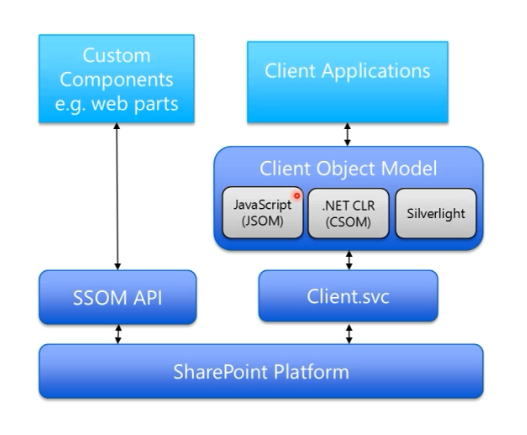
How Client Object Model Work?
View below image
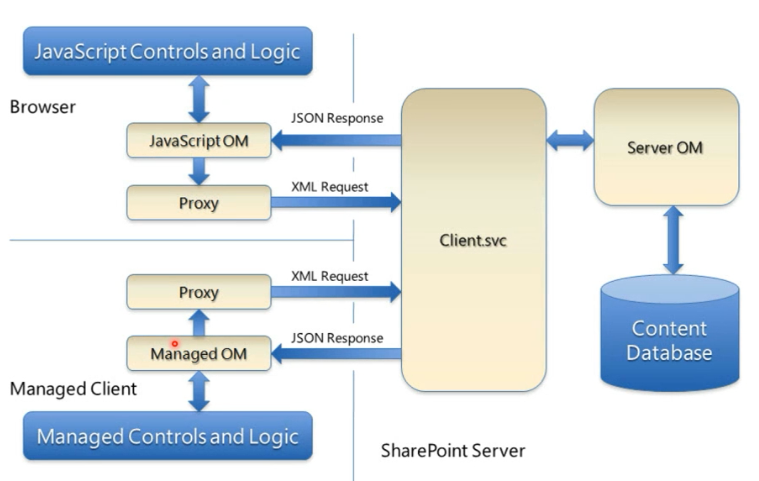
3.REST/OData API
-URL based api
-REST: Representational state transfer
-URL based protocol
-Technology and platform independent
4.SharePoint Web Services
SharePoint has provided some web services to access SharePoint data, we can use that services in client application.
Client Object Model
REST/OData API
SharePoint Web Services
1.Server Side Object Model
-Full trust code using C# or VB.Net
We will use this option most of the times for on-prem SharePoint projects. Since the code will run in the SharePoint server itself. All your code bits will be deployed in SharePoint Server.
-You need add below dlls to develop SharePoint farm solutions
-Microsoft.SharePoint.dll
-Microsoft.SharePoint.Administration.dll
-You need to add below name space while developing SharePoint solutions(Farm solutions)
-Microsoft.SharePoint
-Microsoft.SharePoint.Administration
Some of the class names:
Under: -Microsoft.SharePoint.Administration
-SPFarm
-SPServer
-SPWebApplication
-SPDatabase
-SPContentDatabase
Under: -Microsoft.SharePoint
-SPContext
-SPSite (To access SharePoint sites. Ex:SPSite.RootWeb() will return root site of site collection)
-SPWeb (To access all List and Libraries.Ex: SPWeb.Lists; will return all list objects)
-SPList (To access list fields, items..)
-SPField
-SPListItem
2.Client Object Model
-.Net client side object model (CSOM). Using C# or VB.Net
-JavaScript Object Model (JSOM). Using javascript, jQuery
-SilverLight Object Model
CSOM -Will be used in on-prem environment or SharePoint App Development(Provider hosted app). We can't use SPO.
JSOM -Will be used in all environments. On-prem or SPO.
Why Client Object Model?
-Using Server Side Object Model, we can develop solutions and we have to deploy that in SharePoint server.
But take a scenario, one Custom Application (Which is not SharePoint Application. Ex: some Windows client app) has to communicate with SharePoint.
For this we can develop client application using SharePoint Web Services, which will access in Windows client app, so no need to deploy this code SharePoint server.
But the limitation is, We don't have enough Web Services where we can access all SharePoint features using web services.
So what we have to do is, every time, we have to develop custom web services on SharePoint and use that service in Windows client app. Because of this everyone is investing their time and money to write custom web services.
So Microsoft is providing new way to access SharePoint objects with out running that code in to SharePoint server, that is called Client Object model.
View below image..
Client Object Model: No need to deploy in SharePoint Server, we can access SharePoint objects from client system.
How we can write Client Object Model?
A)Using JSOM (Javascript), CSOM(.NetCLR using C# or VB.Net), SilverLight
If your client is using only javascript then you can use JSOM to access SharePoint. You need to add: SP.js and SP.Runtime.js
If your client is using only Asp.Net with C# or Vb.Net then you can use CSOM (C# or VB.Net) to access SharePoint.You need to add:
Microsoft.SharePoint.Client.dll,Microsoft.SharePoint.Client.Runtime.dll
If your client is using only SilverLight then you can use SilverLight to access SharePoint.You need to add:
Microsoft.SharePoint.Client.dll,Microsoft.SharePoint.Client.Runtime.dll
View below image
How Client Object Model Work?
View below image
3.REST/OData API
-URL based api
-REST: Representational state transfer
-URL based protocol
-Technology and platform independent
4.SharePoint Web Services
SharePoint has provided some web services to access SharePoint data, we can use that services in client application.

SharePoint Hierarchy
-SharePoint Farm -Web Application -Site Collection -Top Level Web Site (Root Site) -Sub Site1 -Sub Site2 -Lists -Field -List Item -Library -Field -Document Item
View in diagram


Friday, 3 October 2014
How to find lenovo ThinkPad serial number?
Open Command prompt.
Run as administrator
Enter this command: wmic bios get serialnumber
Thursday, 2 October 2014
SharePoint 2013 Term-Driven Pages Friendly URL page not found error
Solution:
Follow below steps..
Open SharePoint site.
Site Settings.
Term store management.
Expand term store.
Select your term.
Select "NAVIGATION" tab
Under Navigation Node Type
Set: Term-Driven Page with Friendy URL
Save
Now Click on "TERM-DRIVEN PAGES" tab
Under: Target Page Settings
Check: Change target page for this term
Click Browse next to "Change target page for this term" Select any page from Page Libraray.
Save.
Note: Select Root Term Set Group.
Select "INTENDED USE".
Enable: Use this Term Set for Site Navigation.
Other wise term store will not come as navigation url.
Follow below steps..
Open SharePoint site.
Site Settings.
Term store management.
Expand term store.
Select your term.
Select "NAVIGATION" tab
Under Navigation Node Type
Set: Term-Driven Page with Friendy URL
Save
Now Click on "TERM-DRIVEN PAGES" tab
Under: Target Page Settings
Check: Change target page for this term
Click Browse next to "Change target page for this term" Select any page from Page Libraray.
Save.
Note: Select Root Term Set Group.
Select "INTENDED USE".
Enable: Use this Term Set for Site Navigation.
Other wise term store will not come as navigation url.
Wednesday, 1 October 2014
sharepoint result sources query on content type using OR
({searchTerms?} (contentclass:sts_listItem_documentlibrary) path:https://MySC) OR ({searchTerms?} (contentclass:sts_listitem) path:https://MySC SPContentType=MyList)
Subscribe to:
Posts (Atom)